Original title: 《Hardcore Breakdown of Polymarket’s Fee Formula: How Did an Extreme Fee Rate of 90+% Pop Up?》
Original author: Azuma, Odaily Planet Daily
Polymarket suddenly fell into a fee controversy.
Multiple community users discovered last night that when trading on Polymarket, they were charged unusually high transaction fees, and the resulting shares or returns they actually received were clearly lower than before.
Overseas user Frosen (@frosen) even posted screenshots showing that when they tried to place an order for 100 shares at a price of 0.1 cents in an “Economic” category market, the Polymarket front end displayed the predicted payout amount as only $5.2 (the normal amount should be $100)—which corresponds to an absurd fee rate as high as 94.8%!
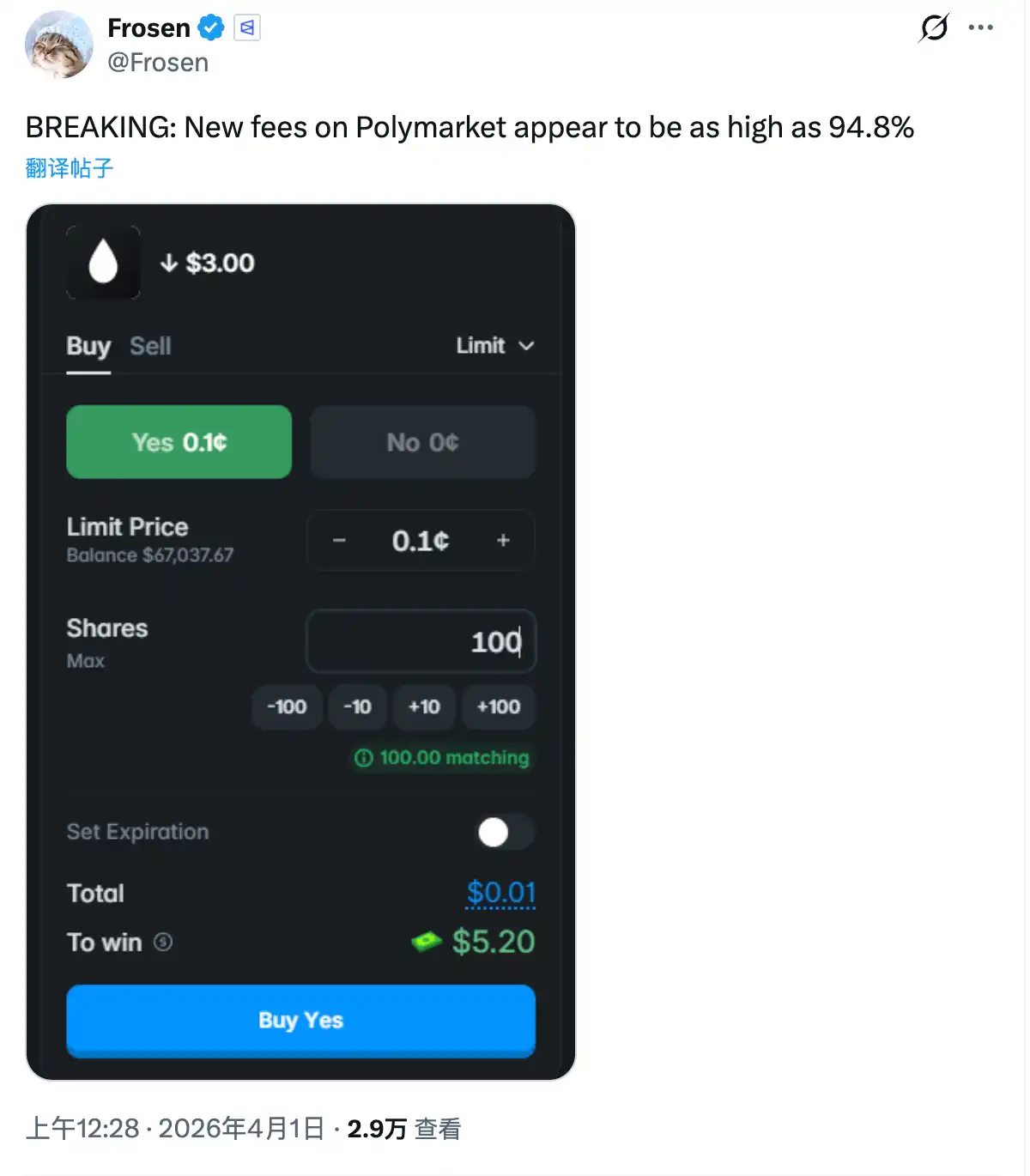
What’s going on here? Is Polymarket out of its mind about wanting money? According to Odaily’s findings based on Polymarket’s official disclosures and community research, the direct cause of this unexpected situation is that Polymarket modified its fee formula for the platform last night, resulting in three versions of changes:
· First was the “old formula” introduced starting March 30: fee = C × p × feeRate × (p × (1 - p))^exponent;
· Then came the first change—this is the formula that caused the unexpected situation (the “abnormal formula” for short): fee = C × feeRate × (p × (1 - p))^exponent;
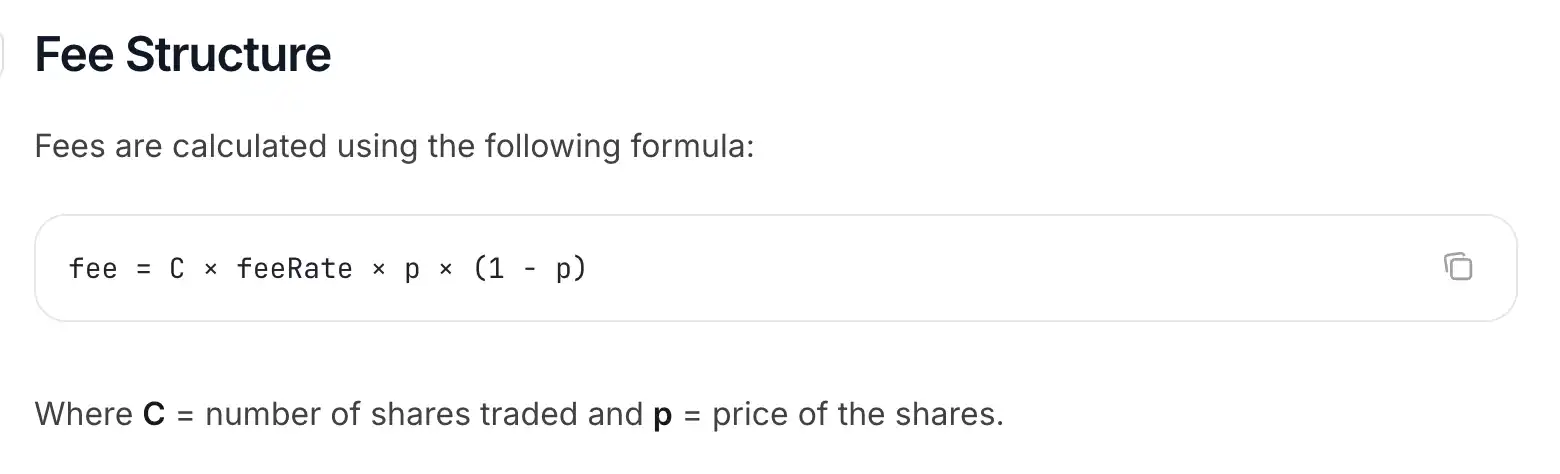
· After Polymarket realized the problem, it made corrections and introduced the current “new formula”: fee = C × feeRate × p × (1 - p);
· It should be noted that in all three formulas, C refers to the number of shares traded, p refers to the trading price of shares, and feeRate and exponent are variables.
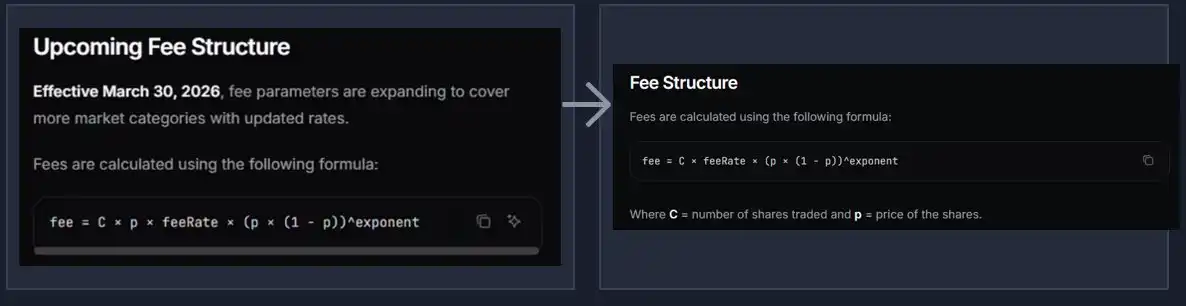
Breaking down the abnormal formula: Where does the absurd 94.8% fee rate come from?
You don’t need to pay too much attention to the math details. By comparing the “old formula” and the “abnormal formula,” you can find simply that compared with the former, the latter only removes one “× p” (this is a multiplication sign, not a lowercase X), meaning the shares price gets multiplied one fewer time in the final calculation.
Because all shares prices on Polymarket are always less than $1, this will inevitably increase the overall fee, and the lower the shares price is, the more pronounced the fee increase will be from missing that one multiplication—when the shares price approaches 0, you may get a very outrageous fee rate.
As for how outrageous this fee becomes, it also depends on the same variable ^exponent that exists in both the old and abnormal formulas. Translating ^exponent directly, it means “raised to the exponent power.” This variable is mainly used to control the steepness of the fee curve.
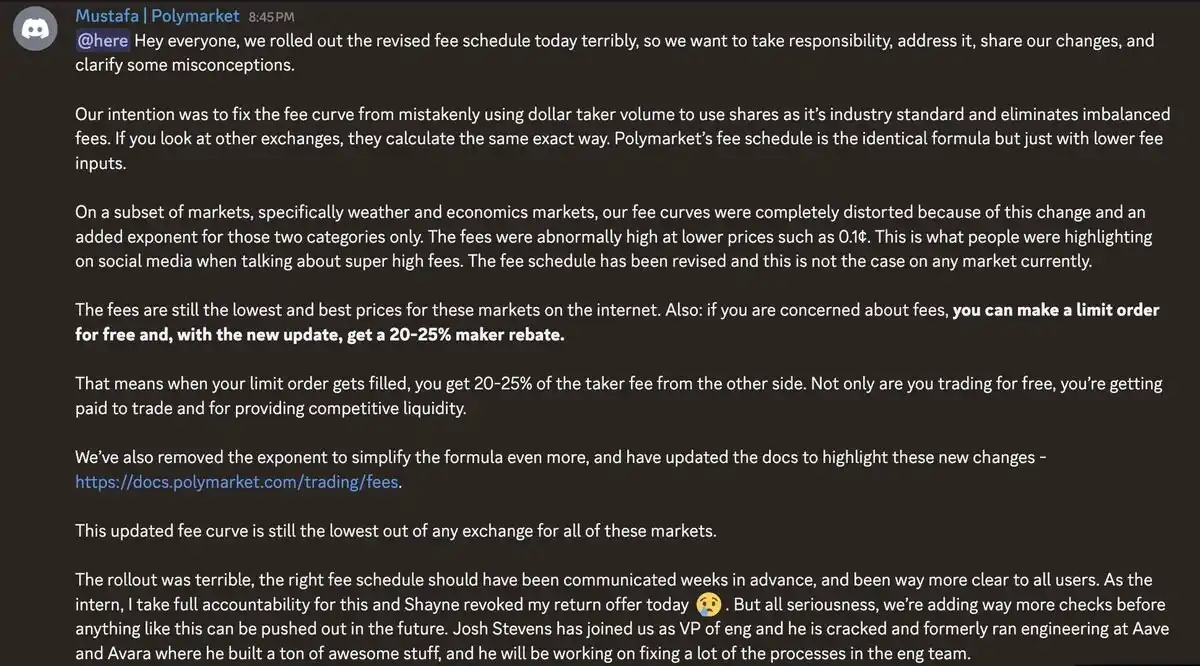
According to what Polymarket official staff member Mustafa said, last night’s abnormal formula introduced exponent only in the “Weather” and “Economic” market categories (for other markets, the parameter is set to 1, so you can ignore this variable). And according to disclosures from overseas KOL Quant Chad (@Autonomous_Chad), the exponent parameter values set for both of these major markets were 0.5.
Now let’s return to Frosen’s case and plug the corresponding numbers into the abnormal formula fee = C × feeRate × (p × (1 - p))^exponent. We know that C equals 100, meaning Frosen wanted to place an order for 100 shares; p equals 0.001, meaning $0.001 (0.1 cents); exponent equals 0.5, meaning one more exponentiation of (p × (1 - p)); and the final fee rate is 94.8%.
Hand it straight to an AI, and it can be used to back-calculate that the feeRate at the time was roughly 0.03, while also reconstructing the formula calculation details Polymarket used for that order.
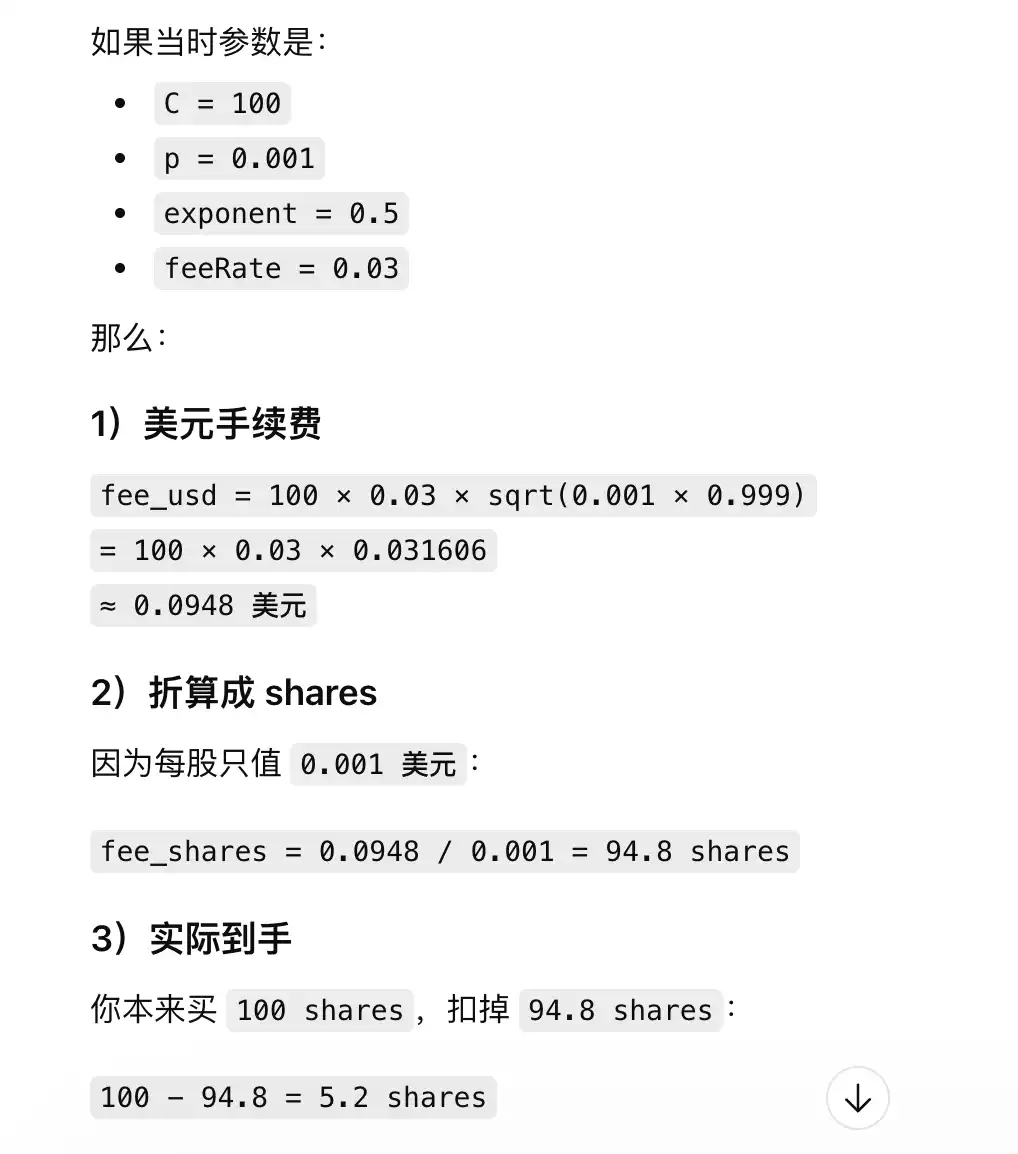
In simple terms: Polymarket used the abnormal formula to calculate that the fee it should charge for that order was $0.0948. But because Polymarket deducts fees for buy orders by directly subtracting the corresponding shares value, and at that time the shares price was only $0.001, it needed to deduct 94.8 shares. So the 5.2 shares that Frosen ultimately received—even if the predicted potential profit was only $5.2.
Polymarket’s remedial measures
Not long after the abnormal fee issue appeared, Polymarket quickly responded by changing the formula to the current version fee = C × feeRate × p × (1 - p). Compared with the abnormal formula, the new formula removes “^exponent”—in other words, it raises the exponent parameter in the abnormal formula fee = C × feeRate × (p × (1 - p))^exponent from 0.5 to 1.
In the abnormal formula, the effect of ^exponent is to perform an additional exponentiation on the dataset p × (1 - p). In Polymarket’s real operating conditions, the theoretical range of p × (1 - p) is between “0.000999 - 0.25”—when p is closer to 0.5 (the shares price is closer to $0.5), this dataset is closer to 0.25. When p is closer to 0 or 1 (the shares price is closer to $0 or $1, with extreme quotes being $0.001 and $0.999), this dataset is closer to 0.000999.
Within the “0.000999 - 0.25” interval, regardless of the chosen value, when exponent increases from 0.5 to 1, it directly reduces the final fee result produced by the formula—thereby reducing the overall fee.
More importantly, this reduction has a more obvious suppressing effect on the extremely high fee rates near very low price levels—when p × (1 - p) = 0.000999, the fee under the new formula is only about 3.16% of the fee under the abnormal formula, equivalent to a drop of about 96.84%; and when p × (1 - p) = 0.25, the fee under the new formula is 50% of the fee under the abnormal formula.
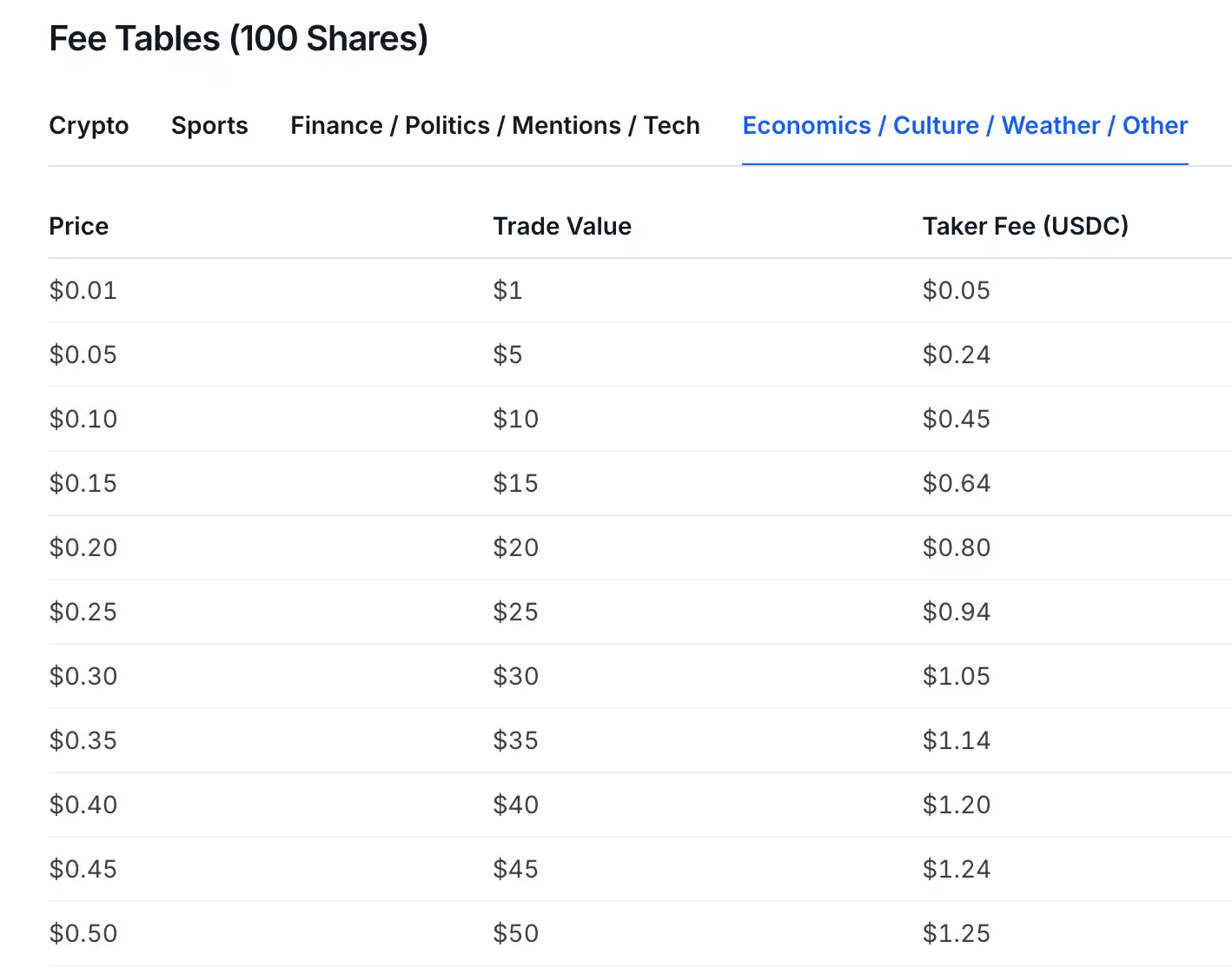
As shown in Polymarket’s official documentation, after the new formula began running, currently in the “Weather” and “Economic” market categories, the fee rate at extreme values has fallen to 5%.
How retail users can avoid transaction fees?
I know that most users are too lazy to look at the formulas above, but at the same time they’re very worried about Polymarket’s current fee problem.
In response, Mustafa mentioned in the official Discord: “If you’re worried about fees, you can freely place limit orders, and after this new update, you can also get a 20%-25% market-making rebate (maker rebate). That means when your limit order gets filled, you’ll receive 20%-25% of the counterparty’s taker fee—so not only can you trade for free, you can even earn rewards by trading and providing competitive liquidity.”
So change your habits—try not to take orders directly anymore, instead use more limit orders. You can also try using Polymarket’s Split feature to indirectly build a position by selling shares on the other side through reverse placing of orders.
Original link
Click to learn more about Lyding BlockBeats’ hiring
Welcome to join Lyding BlockBeats’ official community:
Telegram subscription group: https://t.me/theblockbeats
Telegram group chat: https://t.me/BlockBeats_App
Twitter official account: https://twitter.com/BlockBeatsAsia


