


Applicable Scope
This guide applies to Gate Web
Before you start: Ensure you have a Gate account and are logged in
Estimated time: 5 m
Objective
This guide will walk you through how to understand the security features that protect your assets in Gate Web3 Wallet on Gate Web.
Steps
Step 1: Enable Cloud Backup for Asset Protection
After creating your Gate Web3 Wallet, activate the cloud backup feature immediately. This innovative solution allows you to restore all wallet data by entering your wallet password when switching devices, eliminating the risk of asset loss from forgotten mnemonic phrases or private keys.
To set up cloud backup, access your wallet settings and complete the backup process. Your encrypted data will be securely stored, ensuring seamless recovery across devices.
Step 2: Set Up Your Wallet Password
Create a strong wallet password (also known as Gate fund password). This password uses independent encryption/decryption at both frontend and backend levels. The system employs mainstream HTTPS and ECDH key negotiation algorithms to secure data during communication and prevent unauthorized access.
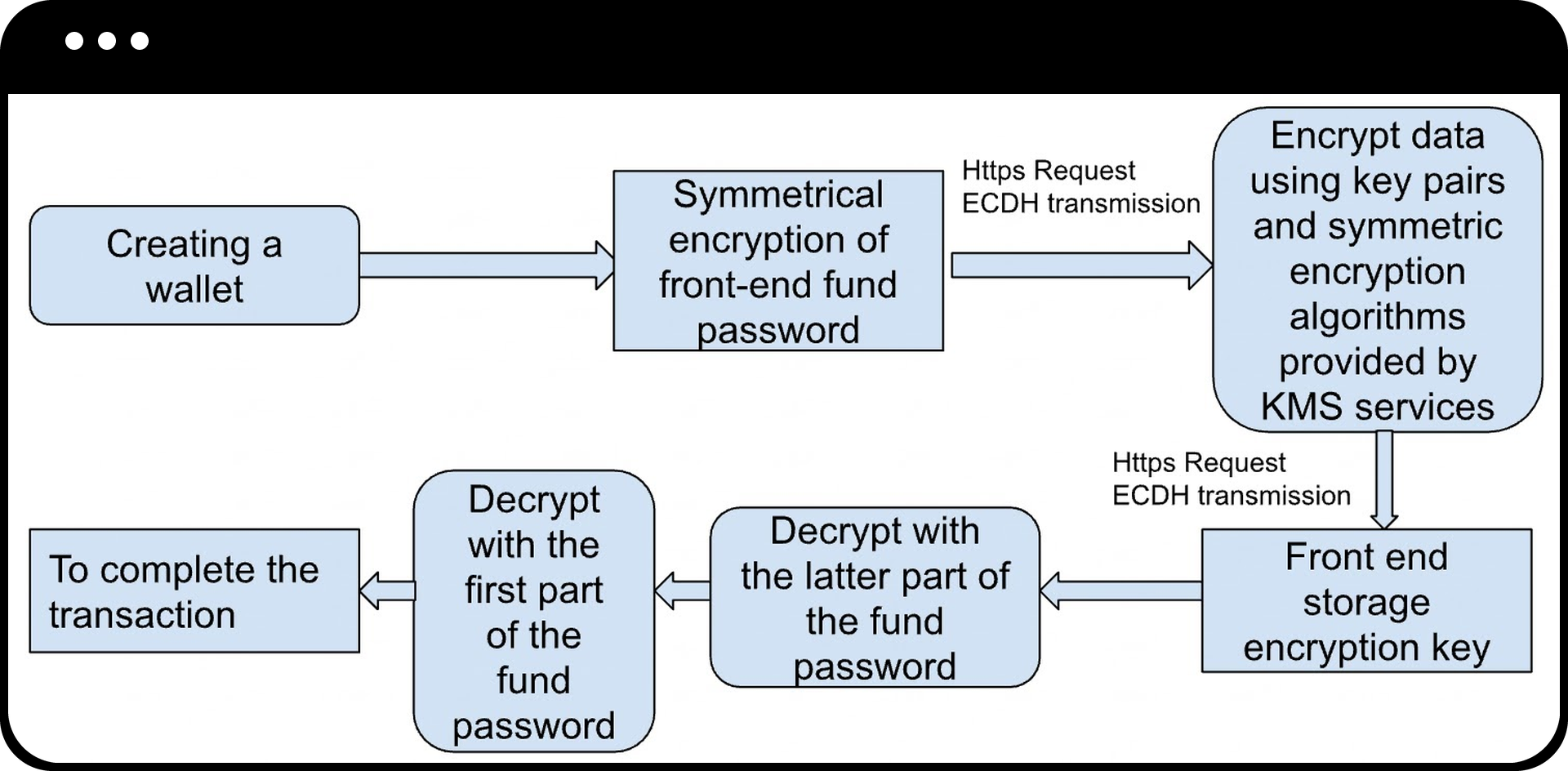
Your password is never stored in plaintext or locally, providing enhanced security for your assets.
Step 3: Review Signature Authorization Details
When connecting to DApps or performing transactions, the Gate Web3 Wallet displays comprehensive signature details:
- Login Signatures: View the information to be signed and source website details before connecting
- Authorization Signatures: Review token information, authorization quantity, and project details before approving DEX transactions
- Transaction Signatures: See expected token balance changes after transaction completion
You can authorize only the specific amount needed for each transaction, avoiding unlimited authorization risks. Disconnect from untrusted websites or cancel authorizations for risky tokens at any time.
Step 4: Connect Hardware Wallet (Optional)
For enhanced security, connect your Ledger hardware wallet via USB or Bluetooth. This allows you to switch between hot and cold wallet modes, providing maximum security while maintaining convenient asset management.
Notes
- Always enable cloud backup immediately after wallet creation to prevent asset loss
- Never share your wallet password with anyone
- Review all signature authorization details carefully before approving transactions
- Only authorize the minimum amount necessary for each transaction
- Digital asset investments involve significant risk and prices may fluctuate substantially
- Gate may update product features, interfaces, and security measures at any time
- This information is for educational purposes only and does not constitute financial advice
FAQ
Q1: What happens if I forget my wallet password?
A: If you have enabled cloud backup and remember your backup credentials, you can restore your wallet. However, the wallet password itself cannot be recovered, emphasizing the importance of securely storing your password information.
Q2: How does the Gate Web3 Wallet password differ from other passwords?
A: The Gate Web3 Wallet password (fund password) uses independent encryption/decryption algorithms and is never stored in plaintext. It employs HTTPS and ECDH key negotiation to protect data during communication, providing superior security compared to standard passwords.
Q3: Should I approve unlimited token authorization for convenience?
A: No. It is recommended to authorize only the specific amount needed for each transaction. Unlimited authorization increases your risk exposure. You can always authorize additional amounts for future transactions as needed.
Q4: Can I use the Gate Web3 Wallet without cloud backup?
A: Yes, but it is strongly discouraged. Without cloud backup, losing your device or forgetting your mnemonic phrase/private key will result in permanent loss of access to your assets.
Disclaimer
The content provided herein is for reference and educational purposes only and does not constitute any financial, investment, trading, or legal advice, nor does it constitute an offer or solicitation to buy or sell any digital assets. Gate makes no express or implied representations or warranties regarding the accuracy, completeness, or timeliness of the information contained herein. Product features, interfaces, rules, and fee structures may be updated or adjusted at any time. Please refer to the latest announcements and the actual information displayed on the Gate platform for the most accurate details.
Digital asset investments involve significant risk, and prices may fluctuate substantially. You may lose the entire amount of your investment. Please make decisions cautiously based on your own financial situation and risk tolerance after fully understanding the associated risks. If necessary, you are advised to consult an independent professional financial or legal advisor.
For more information about potential risks, please refer to Gate's Risk Disclosure and User Agreement.
