


Applicable Instructions
This article applies to: Gate Web
Preparation before operation: Perpetual contract trading account has been activated, and there is sufficient available margin in the account
Estimated time required: 5 minutes
Objective
This article will guide you on how to use the Time-Sliced Order feature on Gate Web to execute contract trades in batches within a specified time frame.
Steps
Step 1: Access the Time-Sliced Order Placement Interface
- Log in to Gate and go to the contract trading interface
- Select the contract trading pair you want to trade
- In the order placement area on the right, click [Time-Sliced Order]
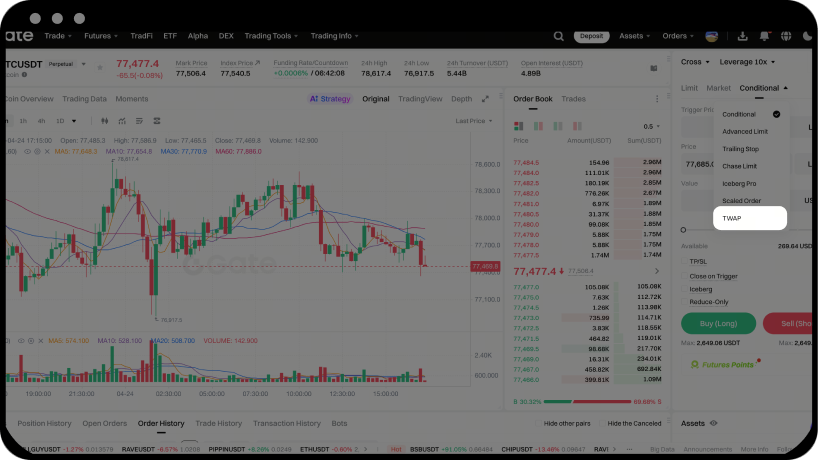
Step 2: Set Time-Sliced Order Parameters
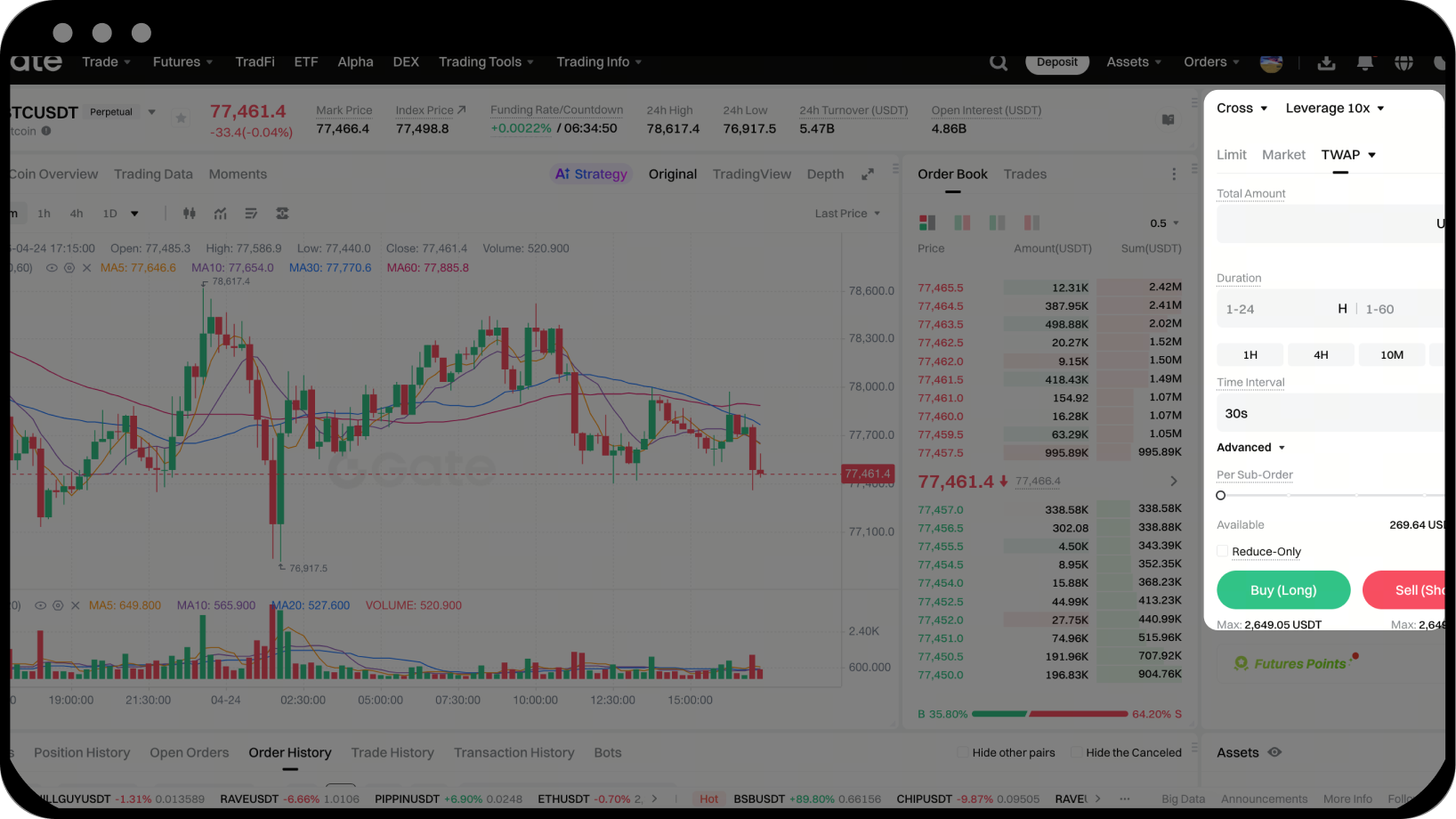
Create a time-sliced order using the following parameters:
- Position Mode: Ensure the selected contract’s position mode matches your account settings
- Total Quantity: Enter the total order quantity, or use the percentage slider to quickly set the contract quantity
- Total Duration: Set the duration for the time-sliced order to run, ranging from 5 minutes to 24 hours, or choose a preset option (10 minutes, 30 minutes, 1 hour, 4 hours)
- Order Interval: Choose the order frequency, ranging from 10 seconds to 120 seconds
- Reduce-Only: Only available in one-way position mode; for hedge mode, switch to the "Close Position" tab
- Advanced Options (optional): Set order price preferences and activation conditions
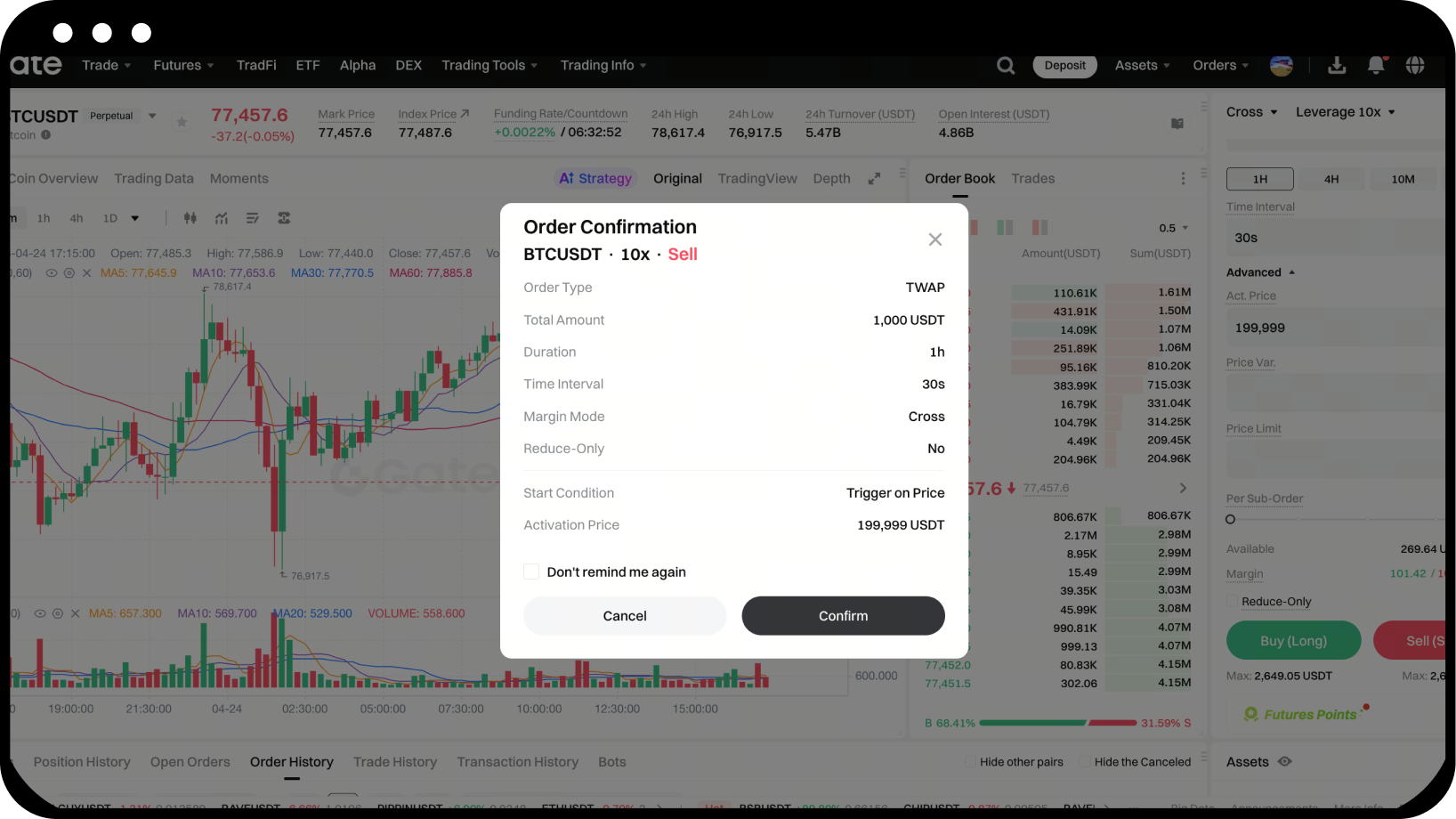
Step 3: Confirm and Submit the Order
Carefully review all parameter settings. Once confirmed, click [Confirm] to submit the order.
Step 4: View and Manage Orders
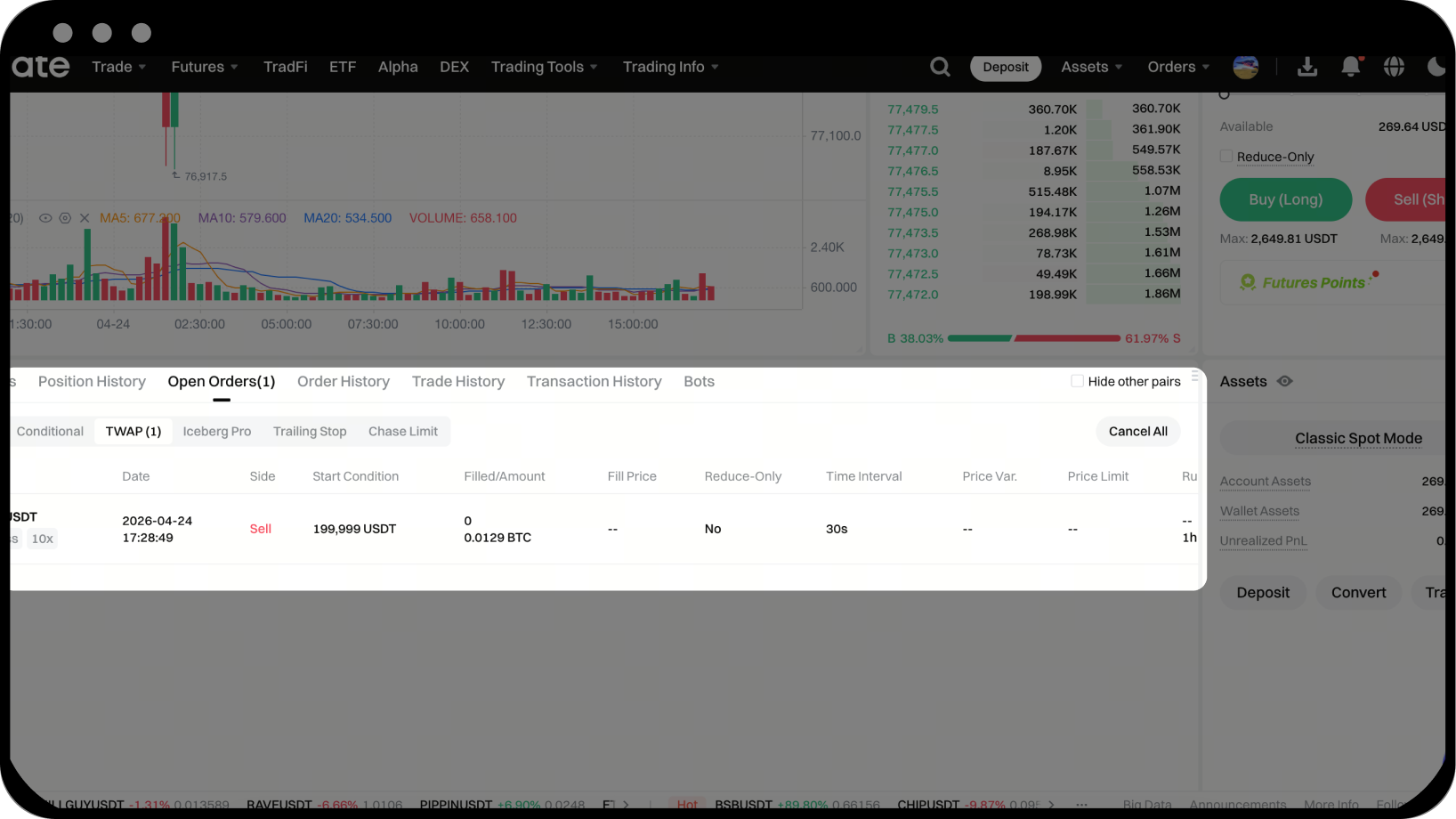
- Locate the [Current Orders] section at the bottom of the trading page
- Switch to the [Time-Sliced Orders] tab to view pending or running orders
- To cancel an order, click the [Cancel] button at the end of the order row
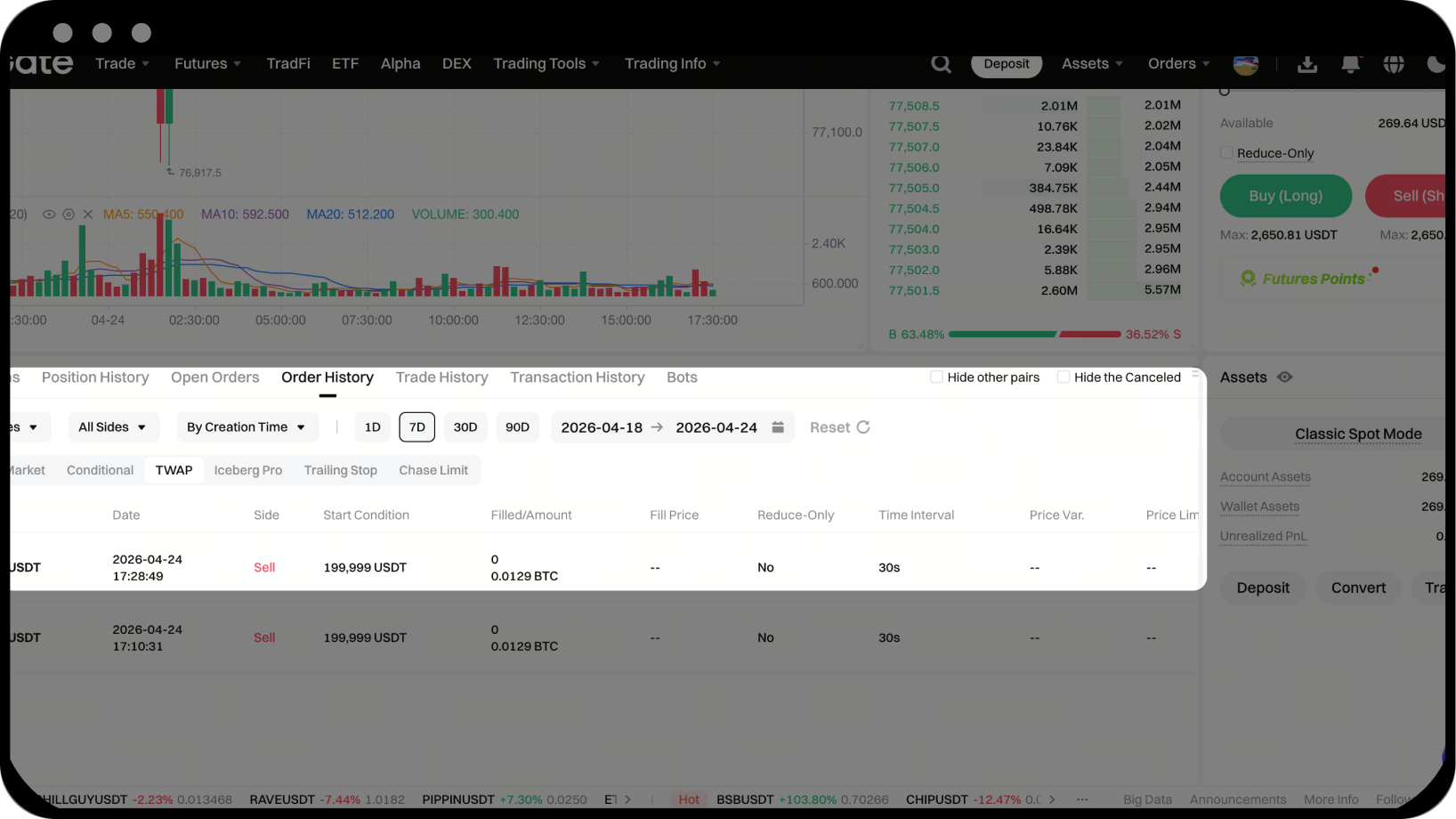
Step 5: View Order History
Check completed or canceled time-sliced orders in [Order History].
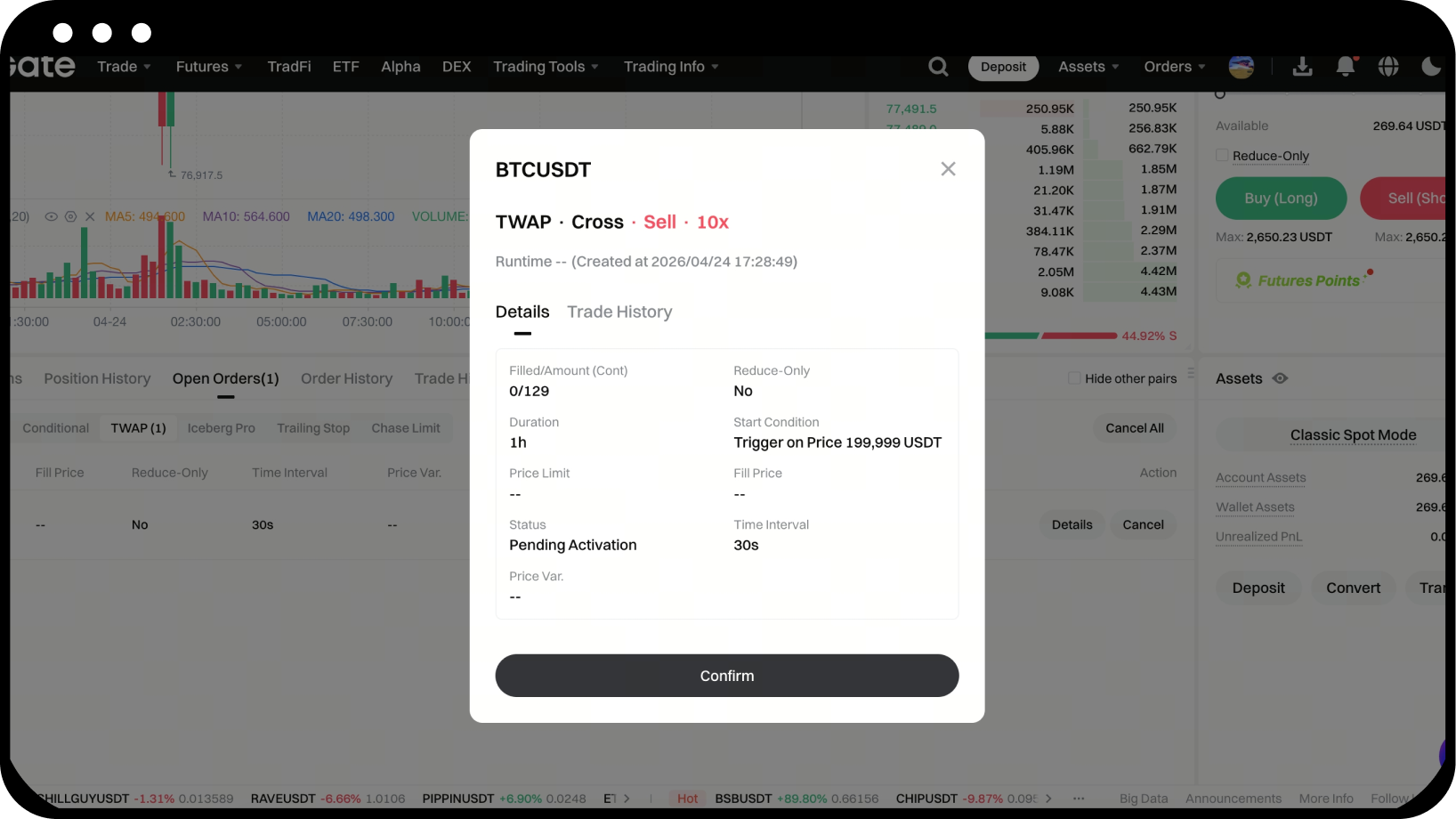
Step 6: View Time-Sliced Order Details
Click the [Details] button in the order list to view the status, parameter information, order records, and fill details of the time-sliced order.
Notes
- Time-sliced orders are available for all perpetual contract trading pairs (including USDT-margined and BTC-margined)
- During order execution, the system automatically adjusts the order price based on real-time market conditions
- If the total trade quantity is completed before the end of the set duration, the order will automatically terminate
- Any unfilled portion will be added to the next order in the sequence
- Canceling a time-sliced order will also cancel all unfilled sub-orders
- After the duration ends, the system will stop placing orders and any unfilled portion will not continue to execute
Frequently Asked Questions
Q1: What’s the difference between a time-sliced order and a regular limit order?
A: A time-sliced order automatically splits a large order into multiple smaller orders and executes them in batches over a set period, helping to prevent large trades from impacting the market price. A regular limit order submits the entire quantity at once.
Q2: What if the entire trade isn’t completed during the set duration?
A: After the duration ends, the system will stop placing orders and any unfilled portion will not continue to execute. You can check the actual filled quantity and remaining unfilled portion in your order history.
Q3: When does the order start executing after setting an activation price?
A: Buy orders start executing when the market price is less than or equal to the activation price; sell orders start when the market price is greater than or equal to the activation price. If no activation price is set, the order will start executing immediately.
Q4: How is the quantity for each small order calculated?
A: The system automatically calculates the quantity per order as:
Single order quantity = Total quantity / (Total duration / Order interval)
For example: Total quantity is 100 contracts, duration is 60 minutes, order interval is 60 seconds, so single order quantity = 100 / (3600 / 60) = 1.67 contracts.
Q5: What does “order price better than the order book” mean?
A: This is an advanced option for setting the order price of each small batch. You can choose either the "Price Distance" or "Percentage" method:
- Price Distance: Buy order price = Latest ask price + price distance (maximum is 1% of the latest market price); Sell order price = Latest bid price - price distance
- Percentage: Buy order price = Latest ask price × (1 + percentage) (maximum is 1%); Sell order price = Latest bid price × (1 - percentage)
Disclaimer
The content provided herein is for reference and educational purposes only and does not constitute any financial, investment, trading, or legal advice, nor does it constitute an offer or solicitation to buy or sell any digital assets. Gate makes no express or implied representations or warranties regarding the accuracy, completeness, or timeliness of the information contained herein. Product features, interfaces, rules, and fee structures may be updated or adjusted at any time. Please refer to the latest announcements and the actual information displayed on the Gate platform for the most accurate details.
Digital asset investments involve significant risk, and prices may fluctuate substantially. You may lose the entire amount of your investment. Please make decisions cautiously based on your own financial situation and risk tolerance after fully understanding the associated risks. If necessary, you are advised to consult an independent professional financial or legal advisor.
For more information about potential risks, please refer to Gate's Risk Disclosure and User Agreement.
